> ## Documentation Index
> Fetch the complete documentation index at: https://support.floweq.com/llms.txt
> Use this file to discover all available pages before exploring further.
# Flow Visibility
> Limit Flow access to specific groups of users
In some situations, you may want to limit access to a Flow to a specific group of users. This can help ensure that only the appropriate users have access to sensitive information or processes.
By default, all users in your FlowEQ account will have access to all Flows. If you do not want to limit access to a Flow, you do not need to take any action.
You will need to assign groups to users in your account before you can assign a Flow to a group. You can do this by navigating to the **Manage Company** page and selecting the **Team** tab to add users to a group. For more information, check out [Groups](docs/using_floweq/mc_groups) documentation.
## Limit Flow Visibility
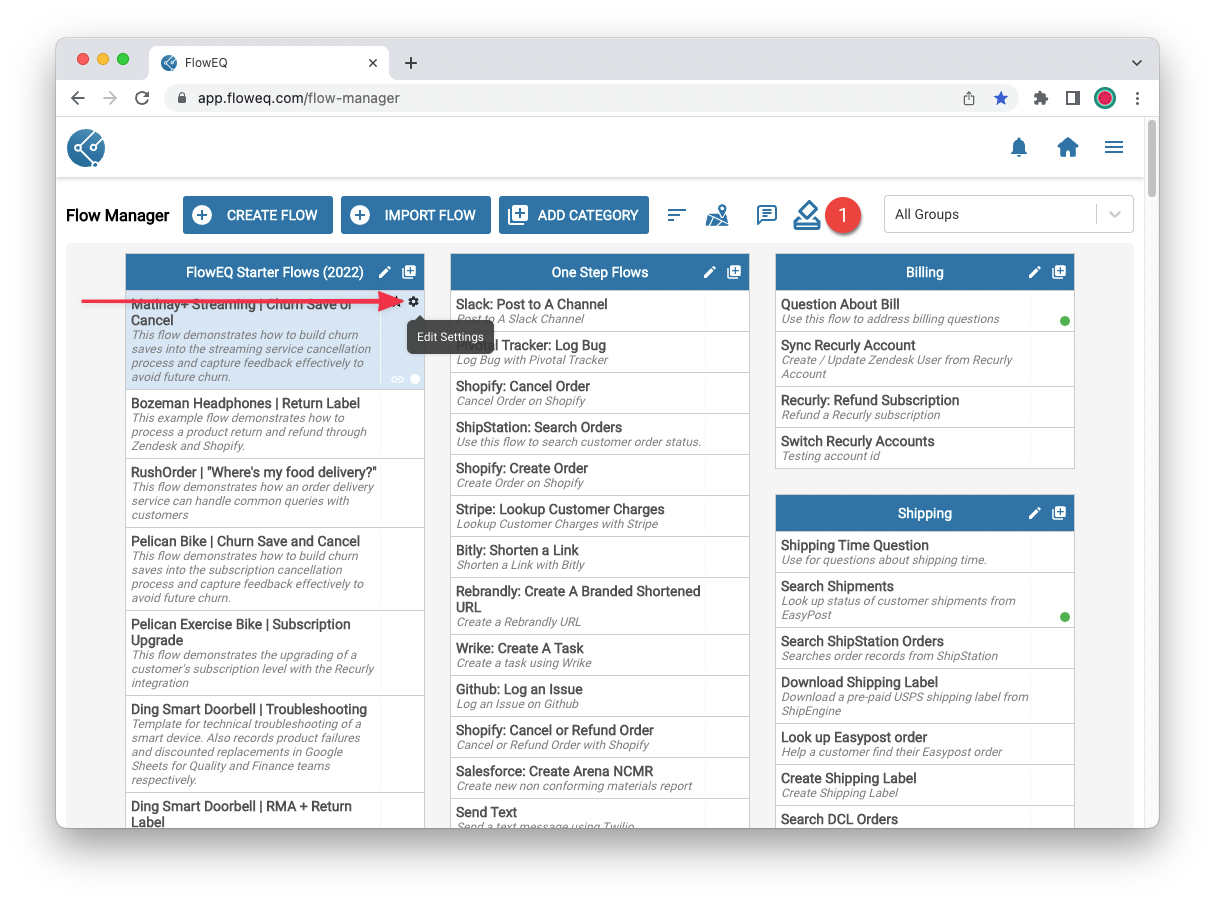
To limit access to a Flow, you can click the small Edit Settings icon from the Flow Manager page.
 Once in the Flow Settings modal, you can click the button "Add filter to limit flow visibility to specific groups". Once clicked, you can select one or more groups that should have access to this Flow.
After selecting the appropriate groups, click the blue **Save** button to save your changes. Now, only users who are members of the selected groups or assigned to no group will be able to see this Flow in Sidekick.
The Flow can still be *executed* by any user, even if they do not have visibility to the Flow. This means that if a Flow is launched by another Flow (via the [Launch Flow Steps](steps/floweq/floweq_launch_intro) or [Boomerang Steps](steps/floweq/floweq_boomerang_intro)).
Using the group assignment feature is a great way to hide Flows that are only used as sub-Flows or modules that are not intended to be launched directly by users.
Once in the Flow Settings modal, you can click the button "Add filter to limit flow visibility to specific groups". Once clicked, you can select one or more groups that should have access to this Flow.
After selecting the appropriate groups, click the blue **Save** button to save your changes. Now, only users who are members of the selected groups or assigned to no group will be able to see this Flow in Sidekick.
The Flow can still be *executed* by any user, even if they do not have visibility to the Flow. This means that if a Flow is launched by another Flow (via the [Launch Flow Steps](steps/floweq/floweq_launch_intro) or [Boomerang Steps](steps/floweq/floweq_boomerang_intro)).
Using the group assignment feature is a great way to hide Flows that are only used as sub-Flows or modules that are not intended to be launched directly by users.