> ## Documentation Index
> Fetch the complete documentation index at: https://support.floweq.com/llms.txt
> Use this file to discover all available pages before exploring further.
# Configuration
> Steps for setting up the Arena integration in FlowEQ
This article will walk you through the process of setting up the Arena QMS integration with FlowEQ. Once activated, this integration will introduce new step types in Flow Builder that will enable you to create and update quality processes and make changes in Arena directly within your workflows.
## Arena Configuration Options
To set up the Arena integration, you will first need:
* An Enterprise level or Custom billing plan on FlowEQ.
* The Arena Rest API enabled in your Arena instance. [Learn more here.](https://github.com/ptc-arena/arena-restapi-doc/blob/main/Arena%20REST%20API/api_licensing.md)
There are two required configuration decisions when setting up the Arena integration in FlowEQ:
* Workspace ID
* User Authentication Method
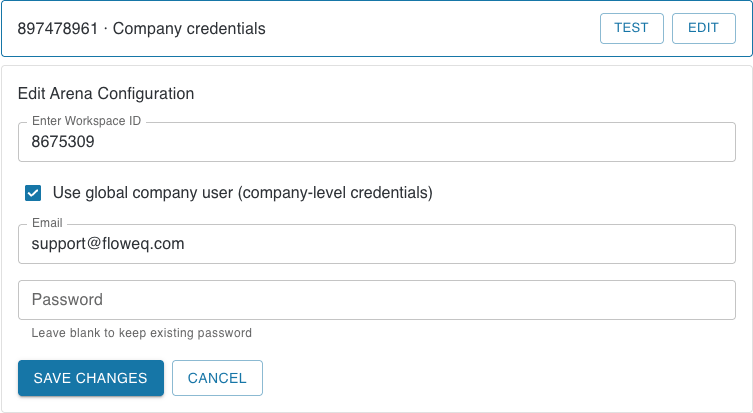 When configuring the Arena integration in FlowEQ, you have two options for how user authentication is handled when using Arena step types in your workflows:
* Company-Level Credentials
* When the *Use global company user (company-level credentials)* option is selected in the Arena integration settings, all team members will use the same Arena account for all Arena step types. This means that any actions taken using Arena step types will be created using this single company-level account.
* If this option is enabled, we strongly recommend using a Machine User account in Arena. A Machine User is a special type of user account that is not tied to a specific individual and is intended for use by applications or automated processes. This helps ensure that the account remains active and accessible even if team members change roles or leave the organization.
* User-Level Credentials
* When the *Use global company user (company-level credentials)* option is not selected, each team member will use their own individual Arena account when creating or updating quality processes using Arena step types. This means that actions taken using Arena step types will be associated with the specific user's account.
* Each individual user will be prompted to login using their Arena credentials the first time they use an Arena step type in FlowEQ.
### Getting the Workspace ID
1. Open Arena at [app.bom.com](https://app.bom.com/)
2. Click your **Profile icon** in the top right, then click **Workspace Settings**.
When configuring the Arena integration in FlowEQ, you have two options for how user authentication is handled when using Arena step types in your workflows:
* Company-Level Credentials
* When the *Use global company user (company-level credentials)* option is selected in the Arena integration settings, all team members will use the same Arena account for all Arena step types. This means that any actions taken using Arena step types will be created using this single company-level account.
* If this option is enabled, we strongly recommend using a Machine User account in Arena. A Machine User is a special type of user account that is not tied to a specific individual and is intended for use by applications or automated processes. This helps ensure that the account remains active and accessible even if team members change roles or leave the organization.
* User-Level Credentials
* When the *Use global company user (company-level credentials)* option is not selected, each team member will use their own individual Arena account when creating or updating quality processes using Arena step types. This means that actions taken using Arena step types will be associated with the specific user's account.
* Each individual user will be prompted to login using their Arena credentials the first time they use an Arena step type in FlowEQ.
### Getting the Workspace ID
1. Open Arena at [app.bom.com](https://app.bom.com/)
2. Click your **Profile icon** in the top right, then click **Workspace Settings**.
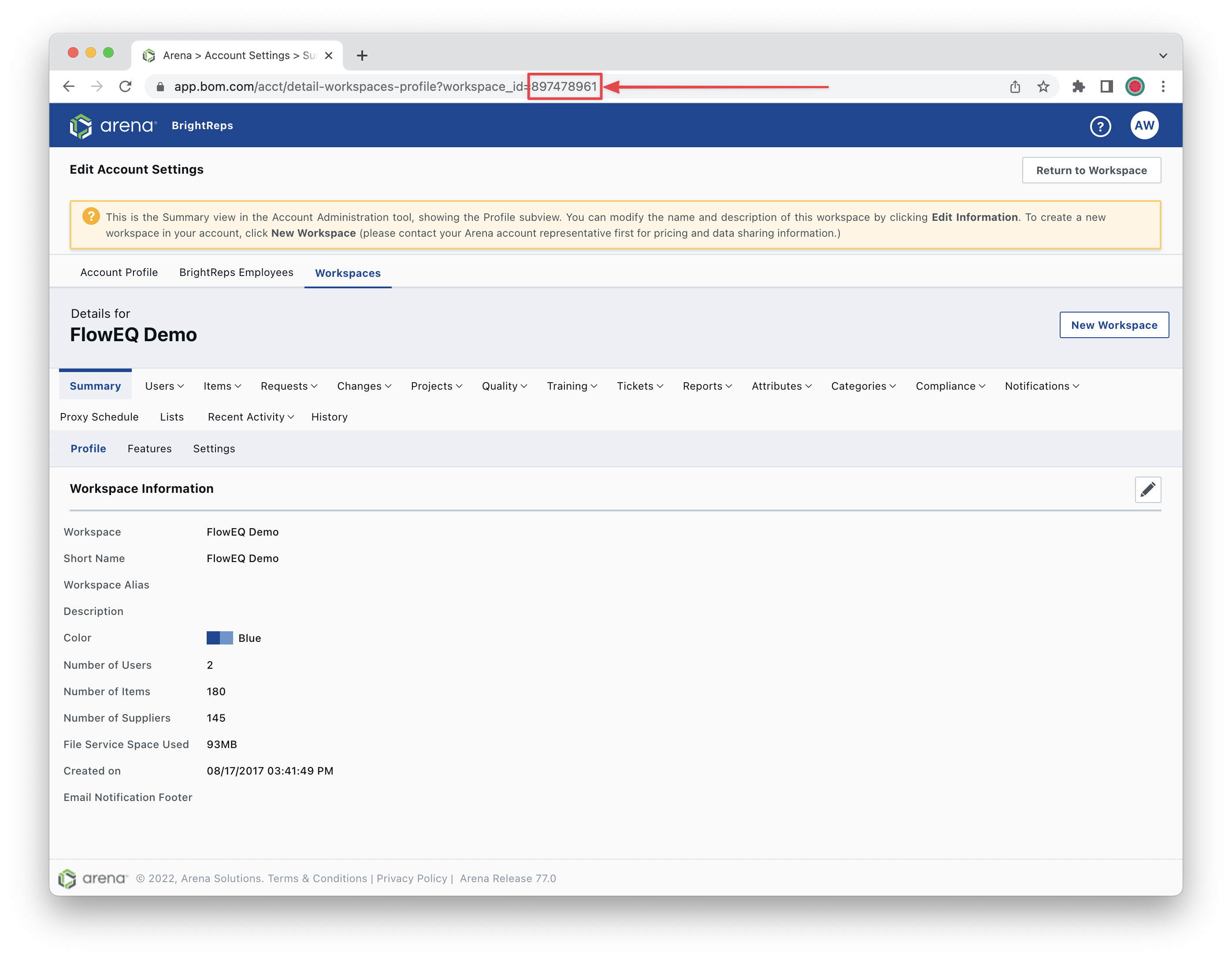
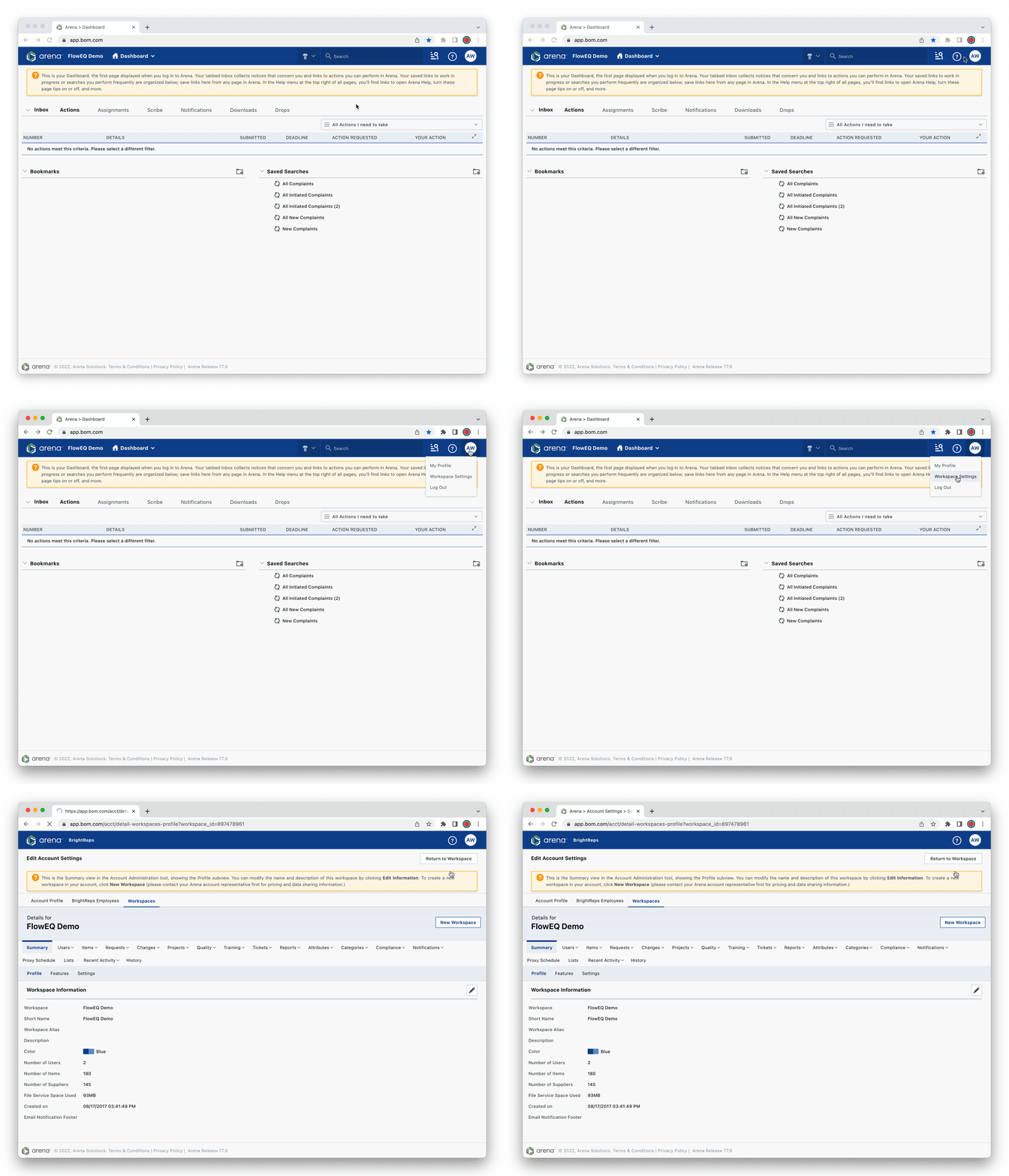 3. In the browser address bar, copy the **workplace ID** number at the end of the URL.\\